Skip to content
AboutNetworks.net

Let's talk About Networks, by Jerome Tissieres

  • Home
  • About
  • Awards
  • Categories
    • Learning & Certifications
    • Data-Center
    • Enterprise Network
    • Service Provider
    • Cloud
    • Wireless
    • Network automation
    • Linux Networking
    • Security
    • Career
    • Blog

switch

  • Home
  • switch
How to add a switch to an existing Cisco C2960X stack without breaking everything

How to add a switch to an existing Cisco C2960X stack without breaking everything

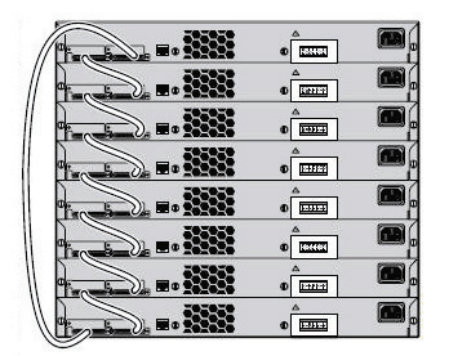
A Cisco C2960X stack can have up to 8 members, however there is only one master on the stack. Adding a switch to the stack without taking a few precautions can have disastrous consequences.

Continue Reading
Read More...
Posted by Jerome Tissieres January 9, 2018
Social
Popular Posts
  • How to install EVE-NG on Microsoft Hyper-V
  • Cisco Nexus NX-OS tips and tricks
    Cisco Nexus
  • Multicast lab 2: Any-Source Multicast with auto RP
  • How to add a switch to an existing Cisco C2960X stack without breaking everything
  • Linux Networking tips and tricks: cURL
    cURL
  • BGP load sharing and unequal cost load sharing
  • Multicast lab 5: Source-Specific Multicast (SSM)
Newsletter
Please sign-up to receive my latest posts directly to your inbox:
Recent Posts Comments
  • Jerome Tissieres on Multicast lab 3: Any-Source Multicast with anycast RP
  • Holger on Multicast lab 3: Any-Source Multicast with anycast RP
  • sprintpark on The Future of Network Engineering in the AI/ML era
  • Jerome Tissieres on First steps with pyATS
  • Keith on First steps with pyATS
Archives
Note from the author

As a non-native English speaker, I may have used a translation tool or grammar checker in some cases, which may have altered my natural writing style. I appreciate your understanding.

Social
Copyrights 2017-2026: Jerome Tissieres - Some Rights Reserved - Terms of use - Cookie Policy
Scroll to Top
Manage Consent
To provide the best experiences, we use technologies like cookies to store and/or access device information. Consenting to these technologies will allow us to process data such as browsing behavior or unique IDs on this site. Not consenting or withdrawing consent, may adversely affect certain features and functions.
Functional Always active
The technical storage or access is strictly necessary for the legitimate purpose of enabling the use of a specific service explicitly requested by the subscriber or user, or for the sole purpose of carrying out the transmission of a communication over an electronic communications network.
Preferences
The technical storage or access is necessary for the legitimate purpose of storing preferences that are not requested by the subscriber or user.
Statistics
The technical storage or access that is used exclusively for statistical purposes. The technical storage or access that is used exclusively for anonymous statistical purposes. Without a subpoena, voluntary compliance on the part of your Internet Service Provider, or additional records from a third party, information stored or retrieved for this purpose alone cannot usually be used to identify you.
Marketing
The technical storage or access is required to create user profiles to send advertising, or to track the user on a website or across several websites for similar marketing purposes.
  • Manage options
  • Manage services
  • Manage {vendor_count} vendors
  • Read more about these purposes
View preferences
  • {title}
  • {title}
  • {title}